
After 8 years of schooling, Bangladesh students take a public examination called Junior School Certificate (JSC). This year, JSC started in 1st November 2018 and ended 15th of November 2018. The board will bring out the result at the same time through publishing it on the website and sending it through SMS. Results can be acquired from the mentioned avenues without any restrictions.
Aside from the website and SMS, the students can also directly get their results from their respective institutes. Because of the advancement of the internet, checking the details and the result of your JSC 2018 exam has become easy and accessible. If you have your smartphone or computer and Internet with you, you don’t have to worry as you are only a few clicks away. Check out the following to know where and how you could check your JSC Result 2018.
How to check JSC result 2018 online
There are websites where JSC examinees can check their exam results. There are two methods to do this Follow the steps below if you want to see your result online.
1st Method:
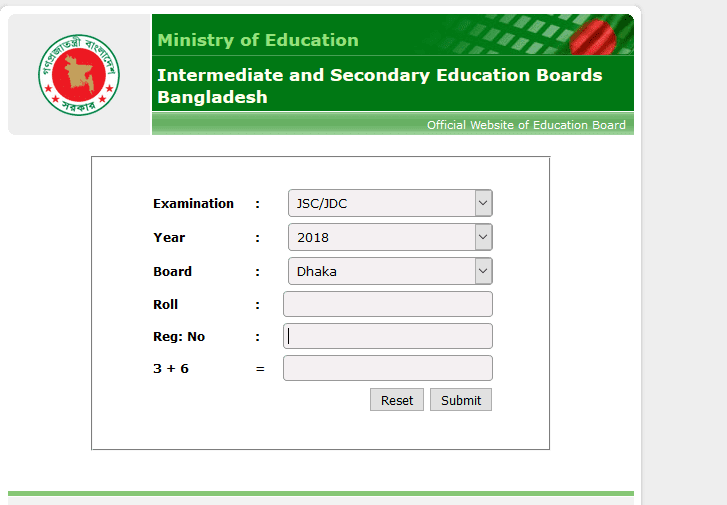
Step 1: Enter educationboardresults.gov.bd in your browser
Step 2: Select examination JSC/JOC
Step 3: Choose the year 2018
Step 4: Select your education board
Step 5: Input your roll number
Step 6: Input your registration number
Step 7: Input the captcha (For example: 2 + 5 = 7)
Step 8: Click the submit button
Step 9: Select JSC Result 2018 / JSC Marksheet 2018
2nd Method:
Step 1: Enter eboardresults.com in the browser
Step 2: Select SSC/HSC/JSC/Equivalent result button
Step 3: Select examination JSC/JOC
Step 4: Choose the year 2018
Step 5: Select your education board
Step 6: If the individual result, choose °Individual’ in the select result type
Step 7: Input your roll number
Step 8: Input your registration number (Optional)
Step 9: Input the security key in the given field
Step 10: Click ‘Get Result’
Step 11:2018 results for JSC/JOC exam will be displayed
How to Check Result with mobile SMS
Checking exam results by SMS is very popular these days, and you can also check your JSC Exam result 2018 and JSC Full marksheet 2018 through this Follow the steps below for the instructions. Just be sure that you have enough balance.
JSC Result 2018 SMS Format :- JSC <space> First Three Letters of Board Name <space> Roll Number <space> Year and send
to 16222. For example JSC OHA 987654 2018 and send to 16222 General Education Boards JSC Result 2018 Process Through SMS
Step 1: Go to phone message option
Step 2: JSC <space> First Three Letters of Board Name <space> Roll Number <space> Year
Step 3: Send SMS to 16222
Madrasah Education Board JSC Result 2018 Process Through SMS
Step 1: Open message
Step 2: JDC <space> MAO <space> Roll Number <space> Year
Step 3: Send SMS to 16222
For example JOC MAO 987654 2018 and send to 16222
JSC result mobile apps
Bangladesh has an official Android application for checking the results of JSC/JDC exams. You just have to download the app on your phone in order to access your results. Check out the following steps to see your exam result using the mobile app. These are all the easy ways students can check their JSC/JOC results 2018. You won’t have any problem accessing it, just make sure to follow the steps and procedures.