
• About Us
  • Contact Us
  • Latest
  • Terms and Conditions
  • Privacy Policy
The Frisky
  • Home
  • News
  • Health
  • Celebs
  • Movies
  • Love
  • Relationships
  • Style
  • Entertainment
  • Parenting
  • Royals
  • Travel
Tech

iBoysoft Drive Manager: Easy way to Access Read-only External Drives on Mac

by Maja Vucetic September 19, 2019
by Maja Vucetic September 19, 2019 Source: maketecheasier
1.8K

Usually, when you connect an external hard drive to your Mac, you should have full access to read and write to it. You are able to edit, remove, rename, duplicate all files, including photos, videos, word files, etc.

However, if this external hard disk is NTFS formatted, it would be a totally different story. When a Microsoft NTFS drive is plugged into a Mac, the users will only have read-only access to this it. That’s to say, the files on it will be only available to be viewed. It’s not a good thing for users who need to transfer files between Windows and Mac.

In this article, you will know how to fix NTFS external drives read-only on Mac.

Contents

  • Symptoms of read-only NTFS external drives
  • How to access NTFS disks with iBoysoft Drive Manager?
  • About iBoysoft Drive Manager
  • Steps to enable NTFS drives’ write support on Mac
    • Conclusion

Symptoms of read-only NTFS external drives

If you right-click this NTFS formatted disk and check its disk information, you will find you can only read this it under the Sharing & Permissions. But before fixing this read-only NTFS storage device, it is important to understand what symptoms of a read-only external hard drive you could see on Mac. Namely, below are some common ones.

1. Files are read-only. When you open the Word files or other documents stored on an NTFS formatted storage media from your Mac, you’ll notice that the file is marked as Read-only. And if you try to edit the content of this file, the pop-up will show ” Word cannot save or create this file. The disk may be full or write-protected”.

2. Video/photos are locked. Also, you could see several folders on your NTFS external storage like videos, My Pictures, etc. are locked and you cannot unlock them anyhow.

How to access NTFS disks with iBoysoft Drive Manager?

There is a utility called iBoysoft Drive Manager that can enable users to write to read-only NTFS external drives easily on Mac. If you are using external hard storage, SD card, a USB flash drive, or any other disk that is formatted with NTFS, this NTFS mounter would be a good solution.

About iBoysoft Drive Manager
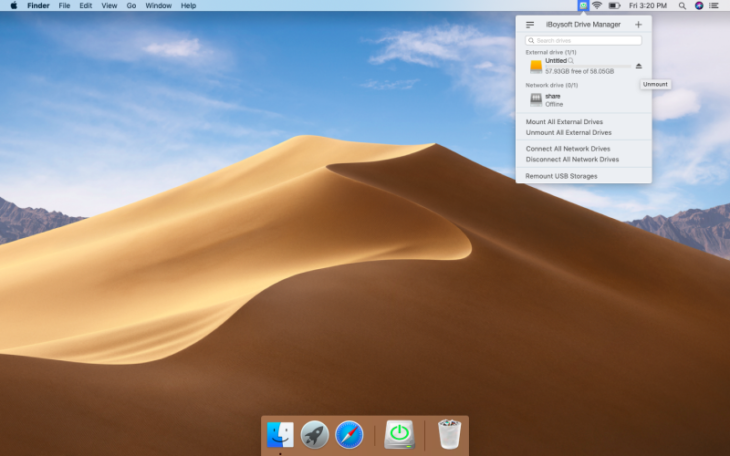
iBoysoft Drive Manager is a disc management tool developed by iBoysoft. Its main function is an NTFS for Mac that used to mount NTFS drives on Mac in read-write mode, letting users write to, delete copy-paste files stored on NTFS on Mac natively and seamlessly.

Except for being an NTFS for Mac app, it is also a disk management tool. You can use it to mount/unmount several external storages in a simple one-click, to map network drives on your Mac locally. It provides a quicker way to access FTP servers as well.

This tool is fully compatible with macOS 10.14/10.13/10.12 and Mac OS X 10.11/10.10/10.9/10.8/10.7.

Steps to enable NTFS drives’ write support on Mac

  • Step 1: Download and install this utility on your Mac. This software offers a free trial for 7 days before purchase, which is a good option for people who worry about the value of this utility.
  • Step 2: After launching the NTFS, you can plug the read-only NTFS external to your Mac like you usually do.
  • Step 3: Once your NTFS is recognized by your Mac, you will be notified that it is mounted successfully. Then your NTFS drive should be not read-only on Mac computers.

Note: When your NTFS drive is read-only on Mac, you can format it to exFAT, FAT32, or another file system that is compatible with macOS. However, it is not recommended to format this drive if you have important files on it. If you have lost the files due to formatting, you can still recover your files with iBoysoft Data Recovery for Mac which is another useful tool provided by iBoysoft.

Conclusion

iBoysoft Drive Manager can grant you full access to the read-only NTFS drives so that you can write to files stored on it on Mac. Thus, using this NTFS for Mac software is more feasible than formatting it with a new file system.

Drive ManagerExternal DriveiBoysoftmacNTFS drive
Maja Vucetic

Maja is a talented writer and content editor at TheFrisky, with a diverse range of interests spanning from the arts to gardening and interior design. A graduate of the Faculty of Arts, Maja brings a unique perspective and a passion for creativity to her work.

previous post
21 Things We Do To Make Ourselves Feel Feminine
next post
Worst Wedding Trend: “You’re Not Invited” Notifications

Related Posts

SWF Don’t Play on MAC?

May 9, 2023

Is It Possible to Use Ms Paint on...

February 4, 2022

Speeding Up a Mac: Tricks That (Don’t) Work

September 24, 2021

Categories

  • Accessories
  • Animals
  • Anime
  • Art
  • Astrology
  • Beard Care
  • Beauty
  • Betting
  • Biography
  • Blog
  • Business
  • Buying Guides
  • Cannabis
  • Cars
  • Casino
  • CBD
  • Celebs
  • Children
  • Citizenship
  • Clippers
  • Clothes
  • Computer
  • Couple Time
  • COVID-19
  • Crime
  • Crypto
  • Culture
  • Design
  • DIY
  • Economics
  • Education
  • Entertainment
  • Environment
  • Family
  • Fashion
  • Featured
  • Food
  • Food & Drink
  • Furniture
  • Galleries
  • Gambling
  • Games
  • Gardening
  • Gifts
  • Girl
  • Gossip
  • Guide
  • Guys
  • Hair
  • Hair Care Tips
  • Hair Dryers
  • Hair loss
  • Hairstyles
  • Health
  • Highlights
  • History
  • Hobby
  • Home
  • Horoscopes
  • Hot Rollers
  • How to …
  • Industry
  • Internet
  • Interview
  • Law
  • Legal Advice
  • Life
  • Lifestyle
  • Love & Sex
  • Love Your Self
  • Makeup
  • Marketing
  • Medicine
  • Mind & Body
  • Money
  • Motorcycle
  • Movies
  • Moving
  • Music
  • Nails
  • Net Worth
  • News
  • Parenting
  • People
  • Pets
  • Photography
  • Products for Hair
  • Real Estate
  • Recipes
  • Relationships
  • Religion
  • Royals
  • SEO
  • Shopping
  • Skincare
  • Sports
  • Studying
  • Style
  • Super Stars
  • Tech
  • Technology
  • The Body
  • Tips
  • Tips & Tricks
  • Tools
  • Toys
  • Travel
  • Type
  • Uncategorized
  • Vape
  • Vehicle
  • Video
  • VR
  • Wedding
Footer Logo
  • About Us
  • Contact Us
  • Latest
  • Terms and Conditions
  • Privacy Policy

© 2024 - All Right Reserved.

TheFrisky.com is a participant in the Amazon Services LLC Associates Program, an affiliate advertising program designed to provide a means for sites to earn advertising fees by advertising and linking to Amazon.com. Amazon, the Amazon logo, AmazonSupply, and the AmazonSupply logo are trademarks of Amazon.com, Inc. or its affiliates.

We at TheFrisky participate in various affiliate marketing programs, which means we may earn commissions on products or services that we recommend or promote through our website. When you click on a link to purchase a product or service that we have recommended or promoted, we may earn a commission from the sale. This commission helps us maintain and improve our website and provide you with valuable information and resources.

The Frisky
  • Home
  • News
  • Health
  • Celebs
  • Movies
  • Love
  • Relationships
  • Style
  • Entertainment
  • Parenting
  • Royals
  • Travel
The Frisky
  • Home
  • News
  • Health
  • Celebs
  • Movies
  • Love
  • Relationships
  • Style
  • Entertainment
  • Parenting
  • Royals
  • Travel
© 2024 - All Right Reserved.

TheFrisky.com is a participant in the Amazon Services LLC Associates Program, an affiliate advertising program designed to provide a means for sites to earn advertising fees by advertising and linking to Amazon.com. Amazon, the Amazon logo, AmazonSupply, and the AmazonSupply logo are trademarks of Amazon.com, Inc. or its affiliates.

We at TheFrisky participate in various affiliate marketing programs, which means we may earn commissions on products or services that we recommend or promote through our website. When you click on a link to purchase a product or service that we have recommended or promoted, we may earn a commission from the sale. This commission helps us maintain and improve our website and provide you with valuable information and resources.
We use cookies to ensure that we give you the best experience on our website. If you continue to use this site we will assume that you are happy with it.

Terms and Conditions - Privacy Policy